Pipelines
Management → Pipelines is the pipeline deployment manager: you assign registry pipelines to one or more Core instances, run Deploy All to synchronize deployed topology with the control plane, and read rollout and execution posture from each row. Use it to coordinate multi-Core pipeline rollout—not to author graph topology or to replace the live operations graph.
Architecture context
| Layer | Responsibility |
|---|---|
| Control plane | Stores pipeline–Core assignments, deployment state, and timestamps; drives Deploy All orchestration. |
| Core runtimes | Apply deployed topology and run workload execution when started. |
| UI readback | Runtime state and deployment signals are reported back from Cores and surfaced in Status, tags, and Core Actions. |
- Assigning a pipeline to Core(s) does not deploy it.
- Deploy All does not start workload execution.
- Execution (Start / Stop / Restart) is controlled separately (Core Actions and Control Tower).
What this page manages
| Surface | Role |
|---|---|
| Pipelines | Pipeline topology authoring (sources, tasks, sinks, wiring). |
| Management → Cores | Component placement and per-component needs deploy / deploy flows. |
| Control Tower (and Core-local controls) | Live execution graph, per-stage health, runtime diagnostics. |
| This page | Pipeline deployment lifecycle: assignment, Deploy All, deployment drift, row-level runtime status, and Core Actions for that pipeline’s execution posture. |
Pipeline assignment lifecycle
At a high level the control plane moves a pipeline from definition to running workloads through distinct steps. Registry edits never auto-push to engines.
| Stage | Operator view |
|---|---|
| No assigned Cores | Row shows no engines; Assign is the next orchestration step. |
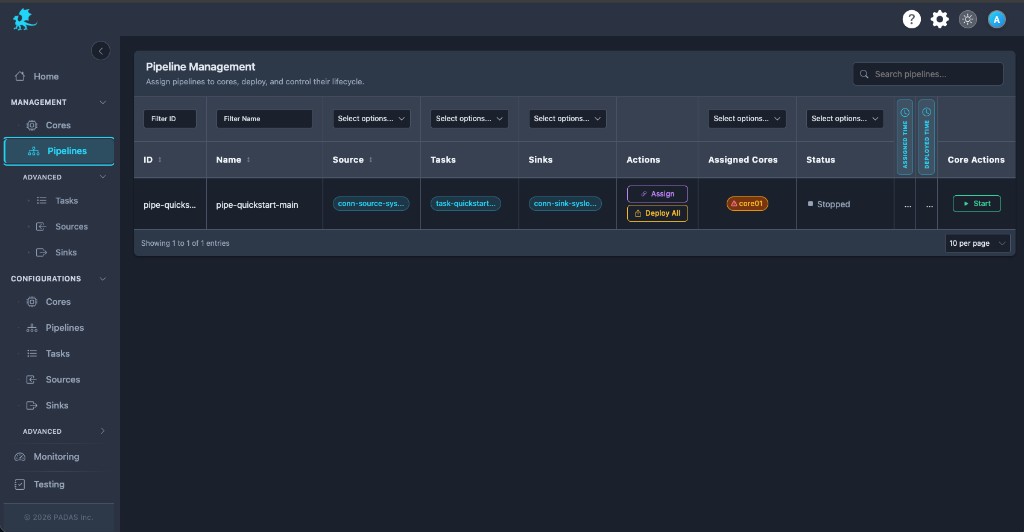
| Pending deployment | Desired definition differs from deployed topology on one or more Cores; run Deploy All. |
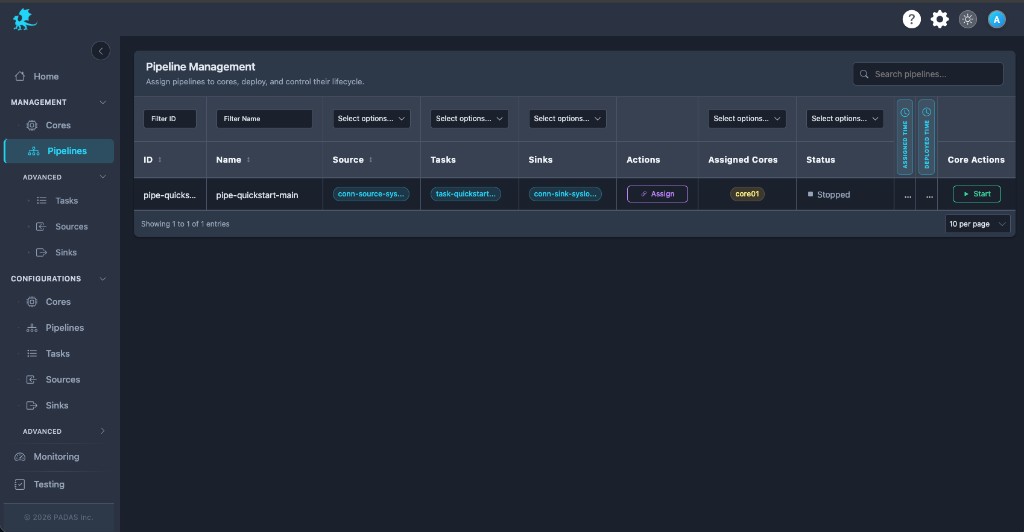
| Ready to start | Deployment is current; pipeline is stopped—use Start when you want execution. |
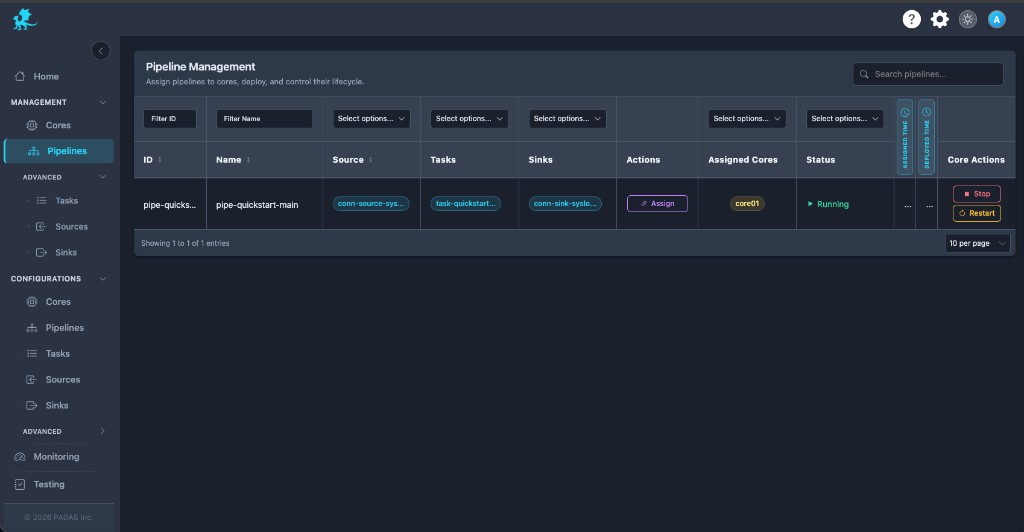
| Running | Workload execution active on at least one Core; use Stop / Restart as needed. |
| Drift detected | Tags or Status show deployment drift or split health—Deploy All and per-Core triage. |
Assign vs Deploy vs Start
| Step | Updates assignment | Deployed on Core(s) | Changes execution state |
|---|---|---|---|
| Assign | Yes | No | No |
| Deploy All | — | Yes ( runtime synchronization ) | No |
| Core Actions (Start / Stop / Restart) | — | Uses last successful deploy | Yes |
Component placement and per-component deploy remain on Cores; this page focuses on the pipeline as a deployment unit.
Pipeline inventory
The grid is the orchestration console for pipeline rows: scan Assigned Cores, Status, and actions before a rollout or incident.
| Column | What operators use it for |
|---|---|
| ID / Name | Stable registry identity for the pipeline definition. |
| Source / Tasks / Sinks | Quick read of deployed topology members (who participates in the graph). |
| Actions | Assign opens which Cores may host this pipeline; Deploy All pushes pending definition to those Cores. |
| Assigned Cores | Which engines are in scope; warning or stale cues flag per-Core deployment issues—open tags for detail when N Cores disagree. |
| Status | Rolled-up deployment and execution summary (Runtime status); not a substitute for Control Tower stage drill-down. |
| Times | Recent assignment or deploy activity for deployment coordination audits. |
| Core Actions | Start / Stop / Restart for this pipeline’s workload execution on the bound Core(s)—orthogonal to Deploy All. |
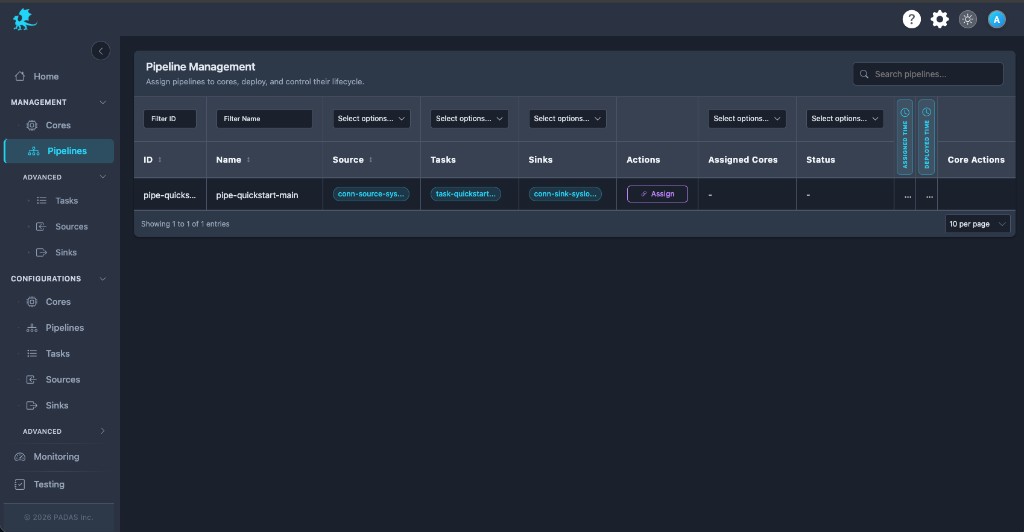
Assign (from Actions) updates only which Cores are allowed to host the pipeline—one-to-many is supported, and each Core keeps independent deployment state.
Deployment drift and sync state
Pending deployment means the desired pipeline definition (registry + assignments) differs from the deployed topology already on one or more Cores.
| Behavior | Detail |
|---|---|
| Per-Core tracking | Each assigned Core tracks deployment independently; one engine can be current while another lags. |
| During deploy | Runtime execution on a Core continues with the previous deployed revision until Deploy All (or equivalent) completes successfully for that slice. |
| Operator cues | Expect Deploy All emphasis, Core-tag warnings, and Status values such as Pending Deployment or Out of Sync—read tooltips before Start if slices are stale. |
Runtime status
Running and deployment posture are separate dimensions: a pipeline can be fully deployed but stopped, or running on one Core while another shows different runtime state.
| Status (examples) | Operational meaning |
|---|---|
| Running | Execution state shows active workload on ≥1 assigned Core. |
| Partially Running | Split rollout or health—some Cores running, others stopped or unhealthy. |
| Stopped | Execution idle; deployed topology may still be present on disk/runtime. |
| Failed | Pipeline-scoped fault surfaced in the row aggregate—investigate per-Core tags and logs. |
| Pending Deployment | Control plane deployment ahead of engine—run Deploy All. |
| Out of Sync | Deployment drift between desired and deployed revision on at least one Core. |
Different Cores may report different runtime states for the same pipeline row—use Assigned Cores drill-down and Control Tower for live topology.
Components after pipeline deploy
Deploy All applies the pipeline graph to assigned Cores. It does not automatically activate every source, task, and sink: those units can have independent runtime state and may still need Cores deploy steps and Advanced (or equivalent) start flows before data moves end-to-end.
Multi-Core behavior
- One pipeline row can attach to multiple Cores; deployment coordination is per engine.
- Deploy All may succeed on subset A while Core B shows deployment drift—resolve B before assuming a uniform rollout.
- Core Actions apply in the product’s defined scope (often per selection or row); confirm behavior in your release when operating distributed runtime topologies.
Operational workflow
Treat this screen as a rollout checklist:
- Confirm Assigned Cores match the intended orchestration footprint.
- Scan Status and Core tags for deployment drift or Out of Sync.
- Run Deploy All until pending cues clear—deployed topology matches intent.
- Verify runtime status matches expectations before deep runtime troubleshooting on Control Tower.
- Use Core Actions to start or stop workload execution when deployment is current.
- After registry edits, repeat Deploy All; reconcile multi-Core failures independently.
Related pages
- Management → Cores — component placement and needs deploy
- Cores — engine registration
- Pipelines — registry topology definitions
- Control Tower — live operations graph
- Advanced — connector / component start surfaces