Sinks
Sinks (/sinks) defines sink connectors: they subscribe to a stream, read PADAS events, and deliver them to external systems. Sources ingest; tasks and pipelines publish into streams; sinks provide egress and outbound integration.
Several sinks may subscribe to the same stream; each connector runs its own delivery path for the events it reads.
What is a sink connector?
| Concept | Description |
|---|---|
| Role | Egress connector: reads from a PADAS stream and sends data out of PADAS. |
| Subscription | Binds to an input stream id; the runtime delivers events published on that stream. |
| Reuse | Stored as a configuration object; referenced by connector id and by stream from tasks and pipelines. |
| Class | Connector class (for example http, kafka, object_storage) selects protocol, formatting, retries, and which runtime configuration fields appear. |
Conceptual background: Core concepts — Sink connectors.
Sinks list
Open Sinks. Use Create to add a connector; row Actions support view, edit, clone, and delete. Filters sit under column headers; the footer shows counts and paging.
Create → Create a sink connector.
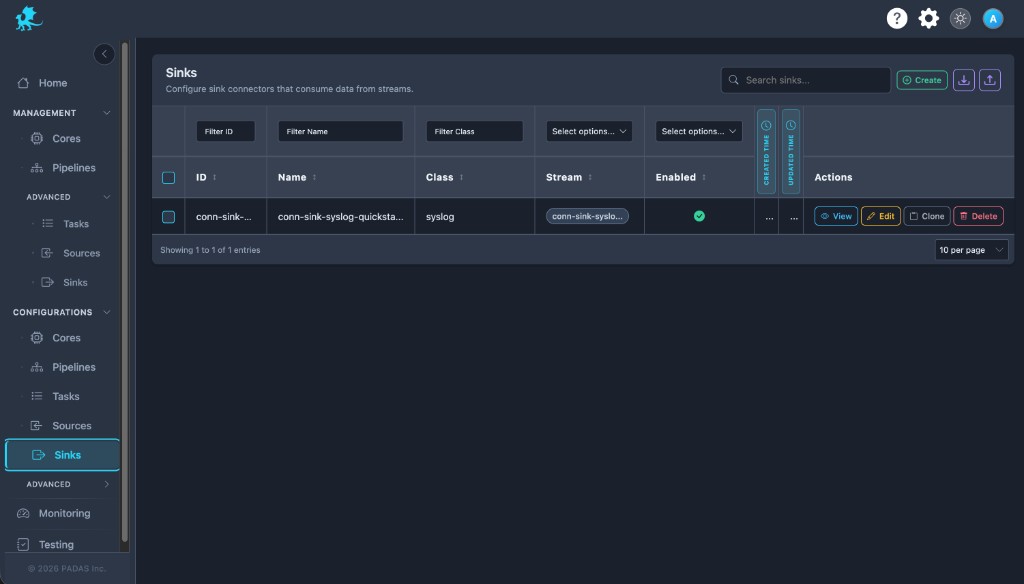
On these Configurations screens the layout is the same: Search and Create in the toolbar, Download / Upload for registry JSON (a full bundle can be imported from any tab), then a grid with filters on the row under the headers.
Each row has View (read-only), Edit, Clone, and Delete. Select multiple rows when you need bulk delete. Created and Updated time may show as narrow strips; use the control at the side of the table to expand or collapse those columns.
| Column | Description |
|---|---|
| ID | Connector id in the registry and API. |
| Name | Human-readable sink name. |
| Class | Connector class (for example http, syslog, object_storage). |
| Stream | Input stream this sink subscribes to. |
| Enabled | Whether the connector may run when deployed. |
| Created Time / Updated Time | Audit timestamps. |
| Actions | View, Edit, Clone, Delete. |
Create a sink connector
- Choose a unique Sink Name (drives the registry
id). - Select Class — pick the delivery mechanism; this controls the rest of the form.
- Configure stream subscription with Auto Create Stream and stream picker (see Stream subscriptions).
- Complete Config — destinations, authentication, format, delivery and buffering options (see Configuration model).
- Set Enabled if the sink should consume and forward traffic once deployed.
- Save. Wire the same stream id from tasks and pipelines so processing publishes where this sink subscribes.
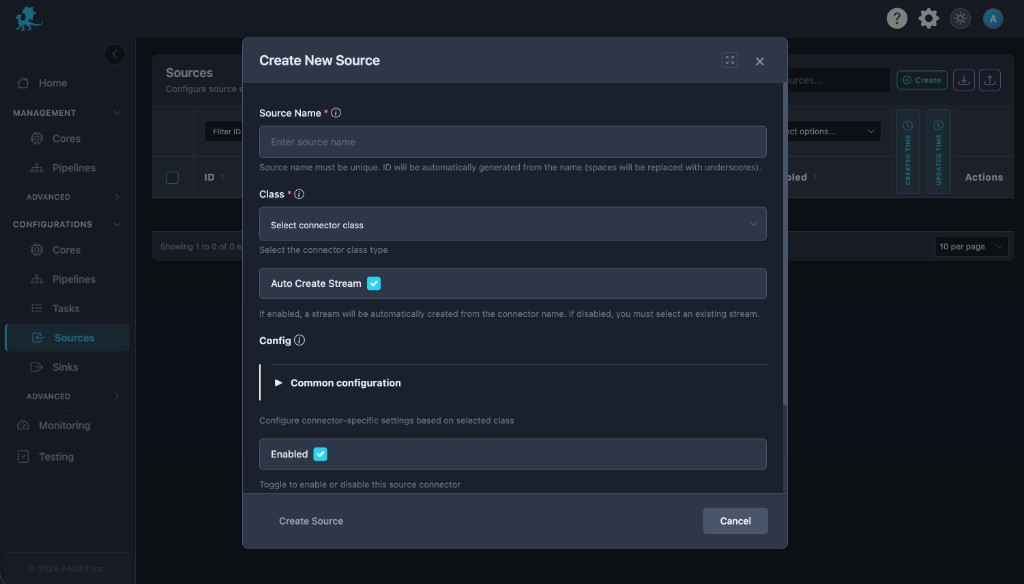
Modal actions: Create Sink and Cancel. Layout mirrors Create Source (same controls; copy uses Sink labels).
Stream subscriptions
A sink subscribes to exactly one stream id at a time (the Stream field). Tasks and pipelines publish events onto streams; the stream is the transport between processing and delivery.
| Topic | Behavior |
|---|---|
| Fan-out | Multiple sinks may use the same stream id; each receives the same event stream and applies its own connector class delivery logic. |
| Naming | Stream ids must line up with sink_streams on tasks and with pipeline topology, or events never reach the sink (Streams). |
| Direction | Sources write into streams; sinks read from streams. |
Auto Create Stream
| Toggle | Behavior |
|---|---|
| Enabled | PADAS creates a stream automatically, typically derived from the connector name. The sink subscribes to that new stream id (shown in the Stream column after save). |
| Disabled | You select an existing stream the sink should consume. The sink subscribes only to that stream id. |
Connector classes
Each connector class implements a different delivery path (protocol, batching, credentials). The class determines available configuration and how the runtime batches, retries, and formats output.
| Class | Role | Documentation |
|---|---|---|
file | File-based delivery | File connector |
http | REST POST (JSON) | HTTP connector |
kafka | Kafka producer | Kafka connector |
padas | PADAS TCP to another node | PADAS connector |
splunk | Splunk-style delivery | Splunk connector |
syslog | Forward to syslog receivers | Syslog connector |
object_storage | S3-compatible object stores (Parquet or JSON Lines) | S3 / object storage connector |
See Connector classes for the full matrix.
Configuration model
Config holds runtime-oriented settings: endpoints, TLS, credentials, serialization, batch sizes, retry/backoff, and class-specific delivery options. Fields depend on connector class—use the class page for authoritative keys and examples.
| Stored field | UI | Notes |
|---|---|---|
id | Derived from Sink Name | Spaces typically become underscores. |
name | Sink Name | Required; unique among sinks. |
class | Class | Required; pick from supported sink classes. |
auto_create_stream | Auto Create Stream | See Stream subscriptions. |
stream | Stream picker or auto result | Input stream id the sink reads from. |
config | Config sections in the modal | Common + class-specific blocks. |
enabled | Enabled | Master toggle for this connector. |
description | Optional description | When exposed in the UI. |
Advanced Settings — Additional runtime controls may appear under Advanced Settings depending on deployment model and permissions; they complement the modal Config when your environment exposes them.
Delivery acknowledgement
A sink acknowledges one range of events from its input stream, then reads the next range. Set this on the sink with config.delivery.mode. The Sinks form has no control for the field yet. Put it on the sink config in the registry. Deploy keeps the key for a sink and drops it for a source. A task that carries the key is rejected. Tasks acknowledge an event when they read it.
| Value | When the range is acknowledged |
|---|---|
best_effort | Default when the key is omitted. The sink commits after a successful send, and also after the connector gives up on a failed send. A crash before that commit can deliver the same range again. |
at_least_once | The sink commits only after the send reports the range delivered. Until then it replays that one range from the input stream’s write-ahead log, while the log still has it. |
at_least_once follows the input stream’s log and buffer mode:
| Input stream | at_least_once |
|---|---|
Write-ahead log on, buffer mode timeout or drop | Allowed. A slow sink can lose the live copy. The log keeps the range until retention. |
Write-ahead log on, buffer mode block | Allowed. A slow sink can stall publishers on that stream. |
Write-ahead log off, buffer mode block | Allowed. The queue is memory only. A restart loses it. |
Write-ahead log off, buffer mode timeout or drop | Rejected at start. |
Stream buffer mode stays the backpressure policy. It answers what happens when the subscriber buffer is full.
Retention still deletes log history, including a range a live sink has not acknowledged. A trim warns and moves every consumer on that stream up to the new floor. UDP syslog cannot use at_least_once. A Kafka sink with acks set to 0 cannot use it. An object-storage sink waits for PutObject of its upload batch. Class pages: Syslog, Kafka, S3 / object storage.
Runtime considerations
- A sink row in Configurations is not live delivery by itself; the connector runs after deployment to a Core and the runtime starts it.
- Disabled sinks do not consume or forward events.
- Stream ids must stay consistent with tasks, pipelines, and sources so the publish/subscribe graph is valid.
- Do not delete a sink connector while a pipeline, task, or deployment still depends on its stream subscription or connector id.
Related pages
- Sources — ingress connectors
- Pipelines and Tasks — where streams are produced and consumed
- Streams — stream ids and wiring
- Architecture — Data plane — how egress fits in a Core instance