Architecture
Big picture
Padas Motion is built around a simple loop inside the Motion Engine (console: Cores; tree: core/):
- Connectors ingest or deliver data
- Streams store and fan out events
- Tasks run PDL (Padas Domain Language) processing to transform, detect, and aggregate
Padas UI is the console and control plane: enroll services, author pipelines, and operate one or more engines. You can also call the engine REST API directly. Management → Control Tower is a screen inside the console (live graph and start/stop on the selected Core)—not a second product and not the whole control plane.
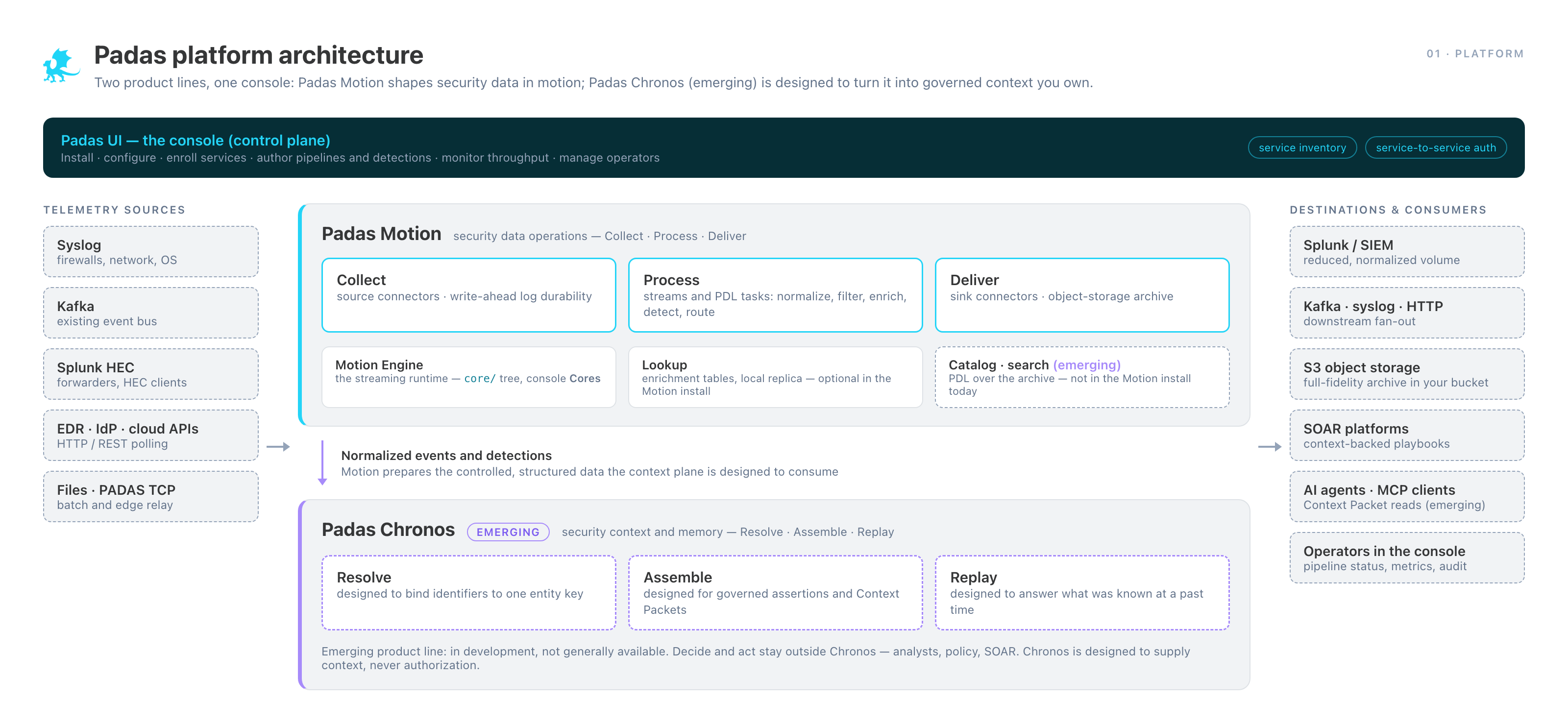
Main components
Padas UI (console)
The console is the control plane: the central management layer for one or more Motion Engine instances. It provides:
- Multi-instance management — configure and control streams, tasks, and connectors across multiple engines from a single interface
- Metrics aggregation and monitoring — collect and visualize throughput, drop rates, and health signals from all managed instances
- Central configuration — deploy and synchronize pipeline configuration across nodes
- Pipeline authoring and testing — build and validate PDL queries and connector configurations before applying them to production
The console communicates with each engine via the REST API Reference (/api/v1).
Motion Engine (processing engine)
The Motion Engine (console: Cores; tree: core/; package: padas-core-*) is the stream processing runtime. Each instance handles:
- Stream lifecycle, buffering, and routing
- Optional per-stream durability via write-ahead log (WAL)
- Task execution (PDL processing and detection)
- Connector runtime (sources and sinks)
- Embedded REST API for local control and data access
The engine is a single binary with no external broker, schema registry, or connector runtime dependencies. Multiple instances can be deployed independently and managed centrally through the console.
Motion data plane
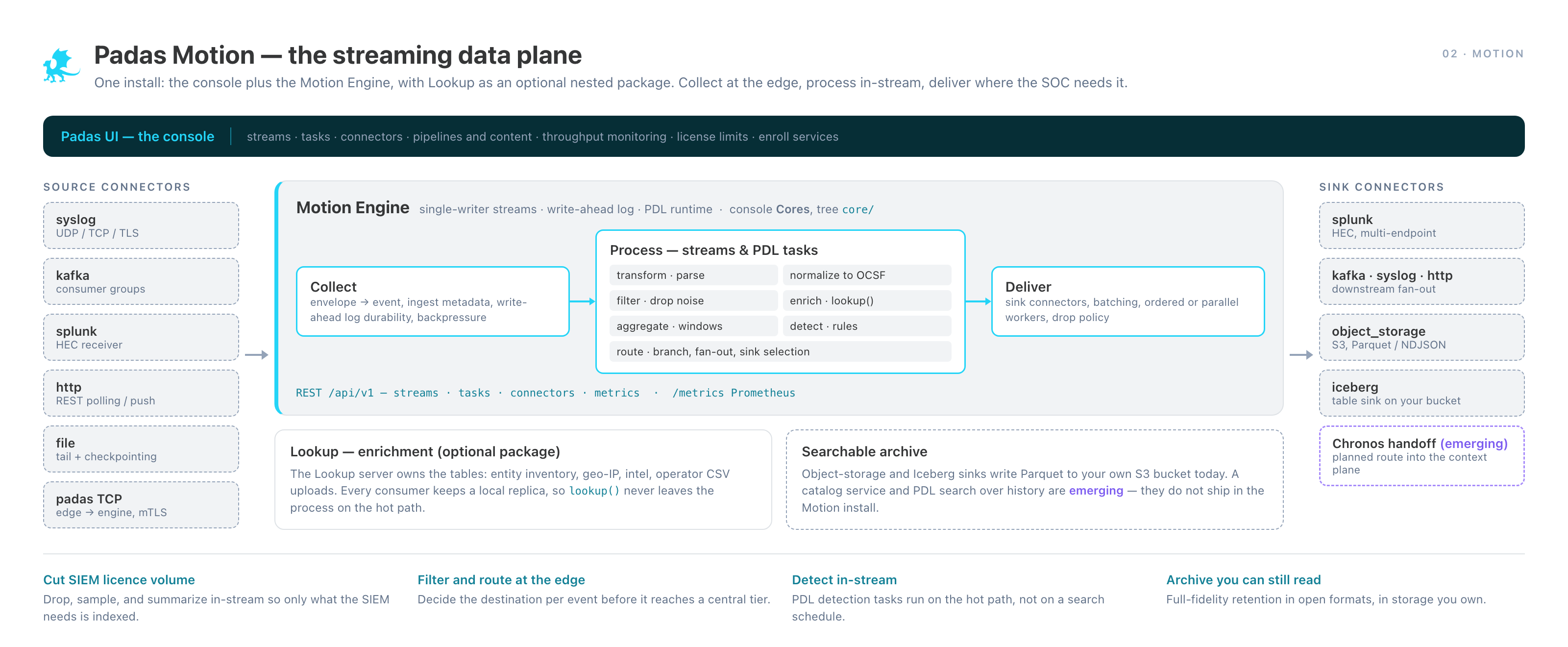
Source connectors ingest events into streams; tasks transform, detect, and aggregate; sink connectors deliver results to external systems.
REST API (engine)
Each Motion Engine instance exposes a REST API that serves as both the configuration interface and the event data interface:
- Manage streams, tasks, and connectors (lifecycle CRUD)
- Produce events to a stream
- Consume events from a stream (stateless; client-managed offsets)
- Query a stream using PDL ad-hoc
- Expose Prometheus-compatible metrics for scraping
The console uses this API to manage and monitor engines centrally.
Connectors (I/O boundary)
Connectors are the integration points to external systems. Each connector is configured with a role (source or sink), a target stream, and protocol-specific settings.
Source connectors (ingest):
| Connector | Protocol / Format |
|---|---|
| Syslog | UDP/TCP, RFC 3164/5424, raw lines |
| HTTP | REST polling or push, JSON |
| Kafka | Consumer groups, SASL/SSL |
| File | File tail or batch read |
| PADAS TCP | MessagePack, cross-node forwarding |
Sink connectors (deliver):
| Connector | Protocol / Format |
|---|---|
| Syslog | UDP/TCP syslog forward |
| HTTP | REST POST, JSON |
| Kafka | Producer, SASL/SSL |
| Splunk | Splunk HEC or API |
| Object Storage | S3-compatible, Parquet or JSON Lines |
| PADAS TCP | MessagePack, cross-node forwarding |
Data flow
Ingestion path (source → stream)
- A source connector receives data from an external system.
- It converts it into events (JSON or text).
- It publishes events to a target stream.
Processing path (stream → task → stream)
- A task subscribes to a source stream.
- It runs a PDL pipeline (filter → transform → enrich → aggregate).
- It publishes results to one or more output streams.
Processing tasks and detection tasks can run concurrently on the same source stream.
Delivery path (stream → sink)
- A sink connector subscribes to a stream.
- It batches and forwards events to an external system.
Multiple sink connectors can read from the same stream independently.
Durability and replay (WAL)
Streams can optionally persist data to a write-ahead log (WAL):
- Enables crash recovery: a connector or task can resume from its last committed offset after a restart
- Enables historical reads: clients or tasks can seek to any offset (or
earliest) and replay past events - WAL segments are sealed, indexed with a sparse offset index, and subject to configurable retention (size or time)
- Adds disk I/O overhead, tunable via batch sizes, compression, and retention settings
In-memory streams (no WAL) are suitable for transient fan-out where durability is not required.
Ordering, partitioning, and backpressure
Ordering
The Motion Engine preserves event order within a stream's routing path. For workloads that need strict ordering for windowed aggregation, stream buffers, connector batching, and optional "preserve order" flags let you trade some throughput headroom for ordering guarantees.
Backpressure
Streams use bounded buffers. When a buffer fills, the engine applies one of three strategies (configurable per stream):
| Mode | Behavior |
|---|---|
| Block | Producer waits until space is available |
| Drop | Events are dropped immediately and counted |
| Timeout | Producer waits up to a deadline, then drops |
Drop and timeout modes are preferred for high-throughput ingestion where backpressure should not stall upstream connectors.
Performance characteristics
The Motion Engine is designed for sustained high-throughput event processing. Actual throughput depends on pipeline complexity: simple filtering and routing runs significantly faster than multi-stage windowed aggregation over high-cardinality fields. WAL persistence, connector I/O, and enrichment lookups each add overhead that varies with configuration and hardware.
Key throughput levers:
- Stream buffer capacity
- Connector worker counts and batch sizes
- WAL compression and batch flushing
- PDL query complexity and enrichment calls
See Configuration & Runtime Engine — Performance Tuning for workload-specific configuration guidance (section placeholder; tuning matrices live in Motion Engine TOML and the Glossary for runtime terms).
Observability
Metrics stream and Prometheus
The engine publishes per-component metrics to _padas_metrics at a configurable interval. The REST API exposes a Prometheus-compatible /metrics endpoint for scraping. Typical signals to monitor:
padas_stream_events_*— throughput and drop rates per streampadas_task_events_*— processing rates per taskpadas_connector_events_*— ingest/delivery rates per connectorpadas_system_*— CPU, memory, and WAL I/O
Internal events stream
_padas_internal receives structured lifecycle and runtime events (connector starts/stops, task errors, WAL segment rotations). These can be consumed like any stream — useful for automating alerts and post-mortems.
Schema strategy: schema-on-read
Motion intentionally ingests data in its original shape and defers normalization:
- Raw syslog lines stay as text payloads until a task parses them
- Structured connector modes decode fields into a reserved ingestion namespace
- PDL tasks can then normalize vendor-specific fields into whatever shape downstream systems expect — common targets include OCSF for security analytics, OpenTelemetry semantic conventions for observability, or internal data models
- Enrichment (geo, asset ownership, threat intel) is applied by PDL tasks that call Lookup
This keeps the ingest edge simple and robust: you don't need a schema contract with every data source upfront.
How Motion extends beyond the engine
The Motion Engine is the streaming runtime. Additional components sit alongside it — the engine does not depend on them:
| Component | Role | Status |
|---|---|---|
| Lookup | Field enrichment via REST/gRPC; local replica for low-latency lookup() | Nested Motion package; optional |
| Historical search / catalog | Query past events from object storage (Parquet/S3) | Emerging — not in the Motion install |
| Padas Chronos (emerging) | Designed to turn processed telemetry into entity context and governed memory | Emerging; not GA; not this install |
Where to go next
- Read Core concepts for definitions.
- See the API and connector references for concrete configuration and examples.
- Install Padas Motion.