Testing
Testing is runtime-safe experimentation: operators capture real stream traffic, replay it through editable PDL, and compare input against output in one validation workspace—without mutating live pipelines. The flow is Capture → persist replay dataset → configure transformation → execute on Core → inspect diff; inputs may be live captures, uploaded vendor samples, or synthetic JSON for edge cases.
This is an enterprise replay / validation console: production troubleshooting, incident reproduction, parser diagnostics, detection tuning, and regression verification all land here. It is not a lone JSON toy, a passive capture viewer, or an isolated query tester—it is the streaming event laboratory where runtime diagnostics meet transformation verification.
Live capture is typically started from Monitoring stream inspection surfaces; Testing continues the story with replay analysis and PDL iteration. The two products pair tightly, but Testing is its own operational surface—not a sub-module buried inside Monitoring.
Runtime scope
| Topic | Operational detail |
|---|---|
| Core-faithful execution | Run Test targets a selected Core so parsing, functions, and limits mirror production runtime behavior. |
| Captures = reality | Replay datasets preserve actual stream traffic from that engine—shape, field quirks, and volume snapshots—not guessed fixtures. |
| Per-Core variance | Connectors, schemas, and load differ by Core; rotate the selector when comparing production-faithful results. |
| Validation before ship | Outcomes inform registry edits; deployment still flows through Configurations and Management. |
Capturing live stream events
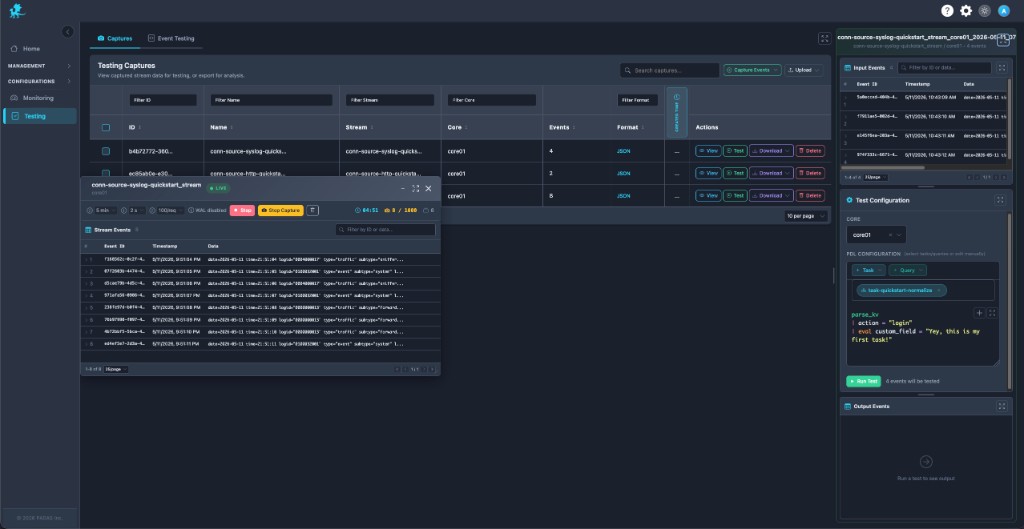
Live capture is available wherever operators already inspect streams—especially Monitoring (Monitor, stream rows, and related actions). A LIVE session surfaces flowing events, guardrails (time, rate, caps), and stop/save controls so teams freeze transient failures before they age out of buffers.
Saved slices become replay datasets that anchor incident reproduction, rollout validation, and parser debugging—the payload is runtime reality, not a scrubbed sample. That matters when chasing normalization drift, connector upgrades, or fleaky vendor logs.
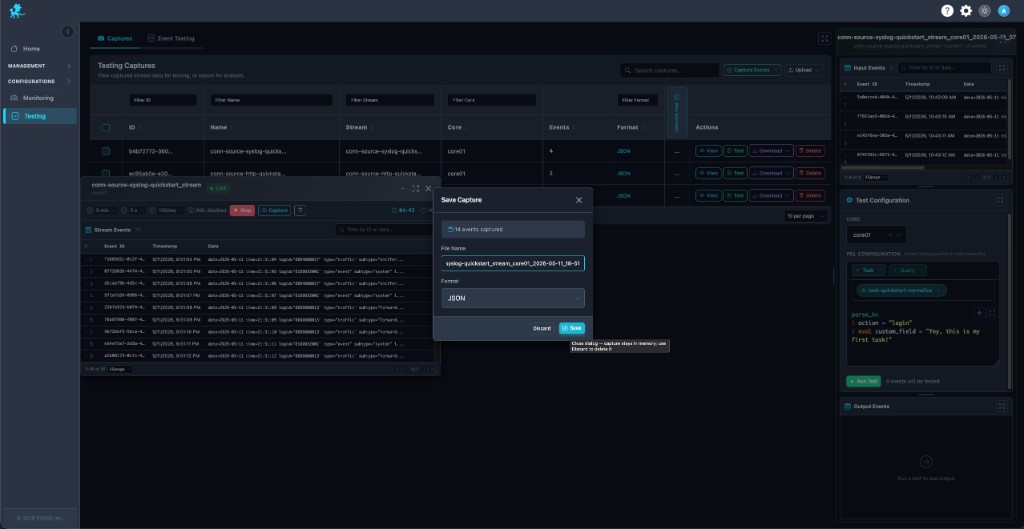
Naming the capture, picking format (for example JSON), and persisting ties the dataset to stream id and Core context for later replay workflows.
Working with captures
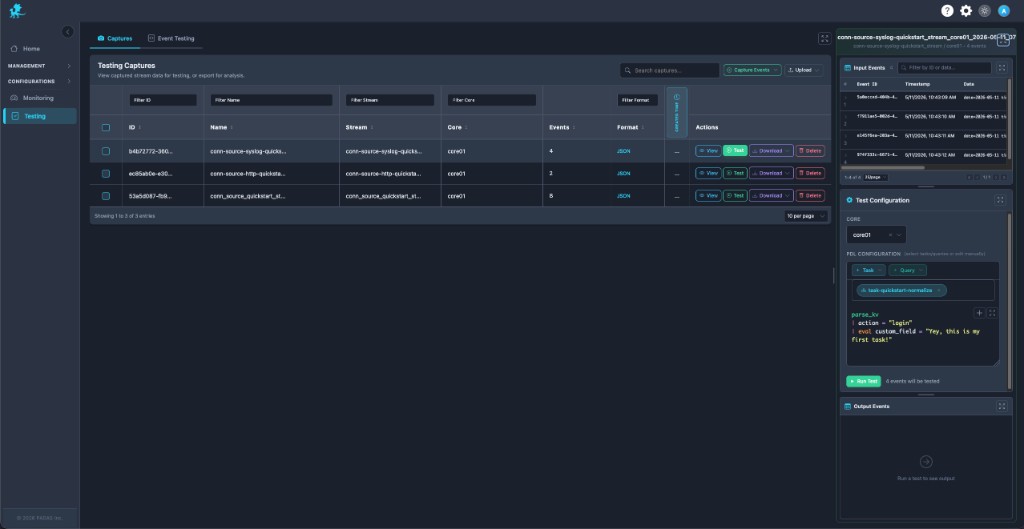
The Captures inventory behaves like replay dataset management: searchable rows with stream, Core, event counts, and format, plus row actions for lifecycle control.
| Action | Operational use |
|---|---|
| Capture Events | Start a fresh live capture when Monitoring surfaces a hot stream. |
| Upload | Import vendor samples, ticket attachments, or regression fixtures alongside production captures. |
| View | Audit payloads before sharing or replaying. |
| Test | Load the dataset into the Input → PDL → Output workspace for transformation verification. |
| Download | Share evidence with engineering or attach to change records. |
| Delete | Retire stale datasets to reduce noise. |
Mature teams often keep golden replay datasets for parser regressions or detection tuning—check them in via Upload or refresh from Capture Events after major connector changes.
Event testing workspace
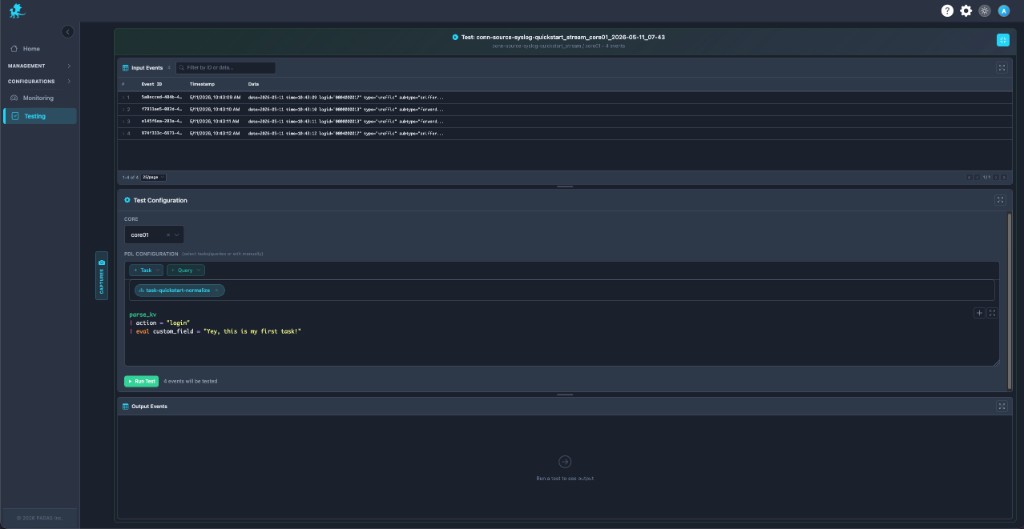
The workspace enforces Input → Transformation → Output:
- Input events — Rows from the active replay dataset (or events pushed from manual validation) with ids, timestamps, and payload previews; filter to isolate failing lines during dropped-event tracing.
- Test configuration — Select Core, inject + Task / + Query snippets, then refine PDL inline for runtime experimentation.
- Output events — Post-Run Test, compare transformed JSON against input for side-by-side validation, malformed-event debugging, and failed enrichment checks.
This is runtime-faithful processing in a sandbox: identical expression semantics to tasks/queries, without publishing experimental bodies to live pipeline paths.
PDL testing and validation
- Transformation verification — Prove
parse_*, filters,eval, projections, andoutputagainst captured traffic before deployment (Quick Reference). - Expected vs actual — Inspect which rows drop, which fields appear, and whether detections fire—core to detection tuning and SIEM-style rule QA.
- Parser iteration — Tighten regex, KV, or JSON parsing using replay-driven development loops on the same replay dataset.
- Production-safe experimentation — Edit freely; nothing commits until you copy winning PDL back into Tasks or Queries and deploy.
Run Test shows how many records will execute—use it as a gate for pipeline validation checkpoints during release windows.
Custom event injection
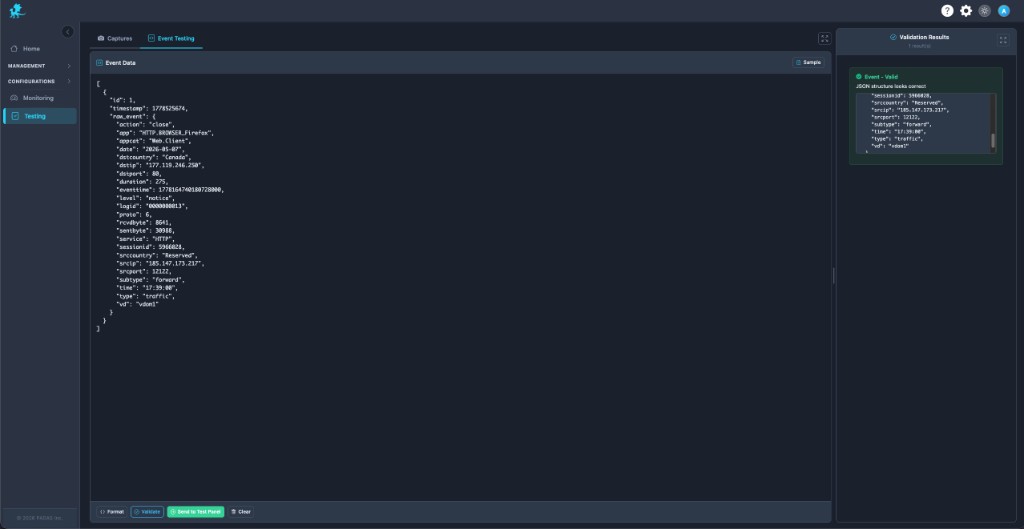
The Event Testing tab supports synthetic event injection: paste JSON, hit Format, Validate, and read Validation Results before execution. That catches structural mistakes early—critical for edge-case validation and malformed-event debugging.
Send to Test Panel bridges handcrafted payloads into the shared Input / PDL / Output flow so synthetic rows interleave with live captures—ideal when reproducing a single bad line from a ticket without capturing thousands of siblings.
Replay and troubleshooting workflows
| Scenario | Replay workflow |
|---|---|
| Malformed vendor logs | Capture or upload sample → iterate parsers → confirm normalized fields in output. |
| Parser regressions | Keep baseline replay dataset → rerun after PDL changes → diff outputs. |
| Detection tuning | Replay suspicious alerts → adjust boolean logic → validate fired vs suppressed rows. |
| Normalization drift | Compare historical capture vs fresh capture through same task snippet. |
| Connector or codec changes | Recapture post-change traffic → replay against legacy PDL to spot breakage. |
| Failed enrichment / lookups | Inject synthetic rows lacking lookup keys → verify fallback eval paths. |
| Dropped event tracing | Filter inputs to dropped ids → step transforms until row disappears. |
| Transient incidents | Freeze streams via Monitoring capture → replay repeatedly under revised logic. |
| Post-fix verification | Replay saved incident bundle → ensure outputs match golden expectations before closing tickets. |
Runtime validation workflows
- Pipeline validation — Block merges until representative captures pass Run Test.
- Incident response — Share captures + outputs as forensic artifacts; avoid replaying directly in prod streams.
- Regression verification — Refresh captures after schema migrations or stream policy updates.
- Operational QA — Pair with Monitoring metrics (drops, EPS) to confirm fixes under realistic load signatures.
Testing does not modify live pipelines or connector bindings: runtime experimentation stays isolated here. Registry and deployment updates belong in Configurations and Management. Treat green Run Test results as validation evidence, then promote changes through your standard release path.
Related pages
- Monitoring — live capture entry points, Monitor, Query, stream diagnostics
- Tasks — persist task PDL after validation
- Queries — saved queries for + Query
- Pipelines — pipeline topology authoring
- Streams — stream semantics affecting captures
- PDL Quick Reference — editor cheat sheet
- PDL Reference — full semantics
- Management → Advanced — runtime start / stop outside Testing
- Glossary — capture, replay dataset, runtime diagnostics vocabulary
- Security — runtime API exposure context for test traffic on Cores