PADAS connector
Class: padas — PADAS-to-PADAS forwarding using MessagePack over the PADAS TCP protocol. Use a sink on the sending Core and a source on the receiving Core (or symmetric pairs) so events cross hosts without Kafka in the middle.
Create and edit under Sources and Sinks. Advanced Settings may expose more runtime options depending on deployment and permissions.
Common patterns: fan-in / fan-out between Cores without Kafka, or DR / tiered processing where one cluster normalizes and another runs heavier workloads.
Source and sink behavior
| Role | Behavior |
|---|---|
| Source | Listener side: endpoint describes the bind host:port where this Core accepts peer connections; decrypted events publish to the connector stream. |
| Sink | Client side: endpoint is the remote host:port of the peer source; consumes the subscribed stream and forwards MessagePack frames. |
| Streams | The receiving source writes a stream that downstream tasks consume; the sending sink reads the stream produced upstream (Streams). |
Required fields
Every connector row
| Field | Required | Notes |
|---|---|---|
name | Yes | Display name; id derived from it. |
class | Yes | Must be padas. |
stream | Yes | Resolved stream id. |
type | Yes | source or sink from the screen used at create time. |
config | Yes | Class-specific object; see below. |
Class padas — required configuration
| Setting | Required | Notes |
|---|---|---|
endpoint | Yes | Source: bind host:port. Sink: remote peer host:port. |
Create connector
- Open Sources (receiver) or Sinks (sender) → Create.
- Set Class to Padas, set name, stream behavior, and Enabled.
- Enter
endpointand complete Authentication (and TLS if shown). - Tune
buffer,batch,workersto link capacity if exposed. - Save, then align streams and tasks so the sink’s subscription matches the pipeline graph.
Source (UI)
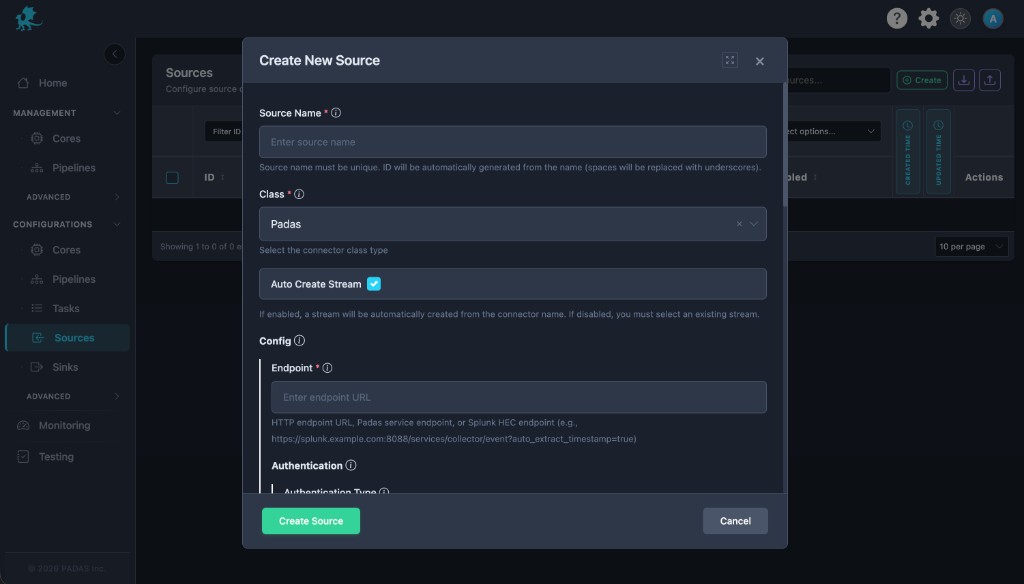
| UI field | Connector setting |
|---|---|
| Endpoint (required) | endpoint |
| Authentication | authentication (type and related fields) |
Sink (UI)
Same Endpoint + Authentication layout on Create New Sink.
Configuration
Typical keys (exact schema follows your build):
- Networking — Bind vs outbound client parameters alongside
endpoint. tls— Encrypt node-to-node links on untrusted networks.authentication— Tokens or mTLS between Cores.buffer,batch,workers— Match link capacity and downstream stream backpressure.
Runtime behavior
Connectors start after deployment; Disabled connectors do not accept or send PADAS TCP traffic.
Performance and operational notes
- Right-size batch and worker counts to RTT and CPU on both ends.
- Monitor reconnect storms when peers restart; prefer TLS for multi-tenant networks.