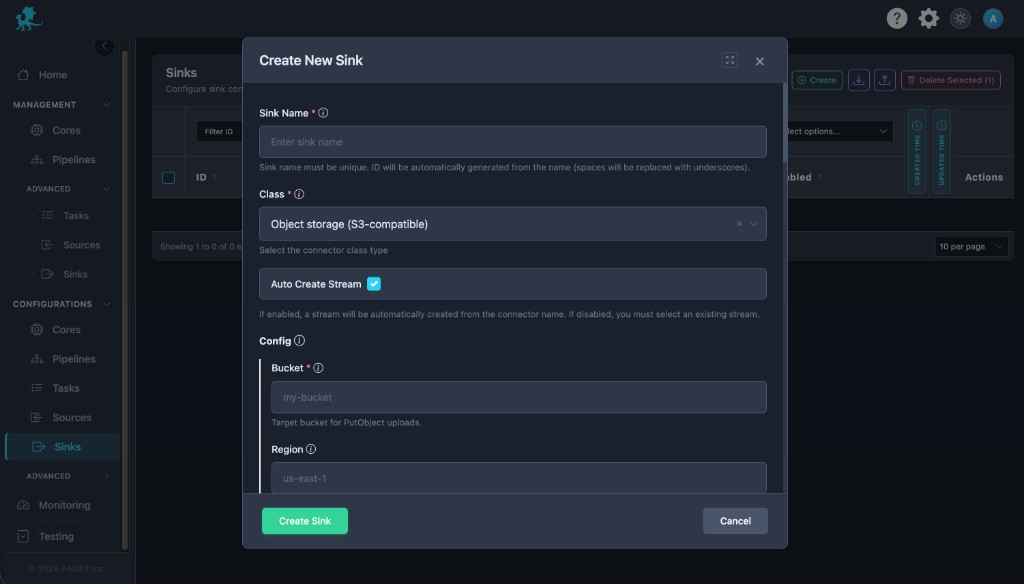
Class: object_storage — Sink-only in the UI: subscribes to a stream and writes objects to S3-compatible storage as Parquet or JSON Lines , with optional compression and batching for large uploads.
Create and edit under Sinks Advanced Settings may expose more runtime options depending on deployment and permissions.
Source and sink behavior
Role Behavior Source Not supported in the UI for this class (type must be sink Sink Consumes the subscribed stream , batches events, and uploads objects using bucketregioncustom endpoint , and format settings. Streams Upstream tasks / pipelines must publish to the stream id this sink consumes (Streams ).
Required fields
Every connector row
Field Required Notes nameYes Display name; id derived from it. classYes Must be object_storage. streamYes Resolved stream id (sink reads here). typeYes Must be sinksource for this class). configYes Class-specific object; see below.
Class object_storage — required configuration
Setting Required Notes bucketYes Target bucket (UI errors if empty). regionConditional Required for default AWS-style endpoints; optional when a custom endpoint
UI validation
emit_verification_manifestmax_batch_bytesmax_object_bytesupload.batch.max_bytesupload.object.max_bytesformat: parquetcompression: gzip
Create connector
Open Sinks Create .
Set Class to Object storage (S3-compatible) , set Sink Name , stream behavior, and Enabled .
Enter bucketregion
Choose format , compression, batch/object size limits, and credentials.
Save , then ensure tasks publish into the subscribed stream .
Sink (UI)
The Object storage sink connector form. UI area Connector settings (typical) Bucket / region bucket, regionEndpoint object_storage_endpoint, force_path_stylePrefix / layout prefixFormat object_storage_format, parquet_compression, …Batch / size max_batch_*, max_object_bytesCredentials role_arn, keys, or instance metadata patterns per build
Configuration
Bucket and layout
bucketregionprefixobject_storage_endpointforce_path_style
object_storage_formatjson_lines vs Parquet plus Parquet row-group and compression options.
Batching and size limits
max_batch_eventsmax_batch_bytesmax_batch_age_msmax_object_bytes
Credentials and IAM
role_arnrole_session_nameexternal_id
Reliability
max_retriesretry_initial_backoff_msintegrity_enabledemit_verification_manifest
Timestamps
timestamp
Runtime behavior
The sink runs after deployment when Enabled ; it drains the stream and uploads asynchronously according to batch settings.
Disabled sinks do not write objects.
Right-size batch thresholds to object size limits and storage rate policies.
Prefer integrity manifests when compliance requires end-to-end object verification.
Related pages